Workflow
NEXT software is in the Github repository next-exp. This page englobes the information for users and developers related to the git workflow that can be applied to any of the main NEXT repositories (NEXUS and IC). It is based on what was presented in the IC-crash-course, where more detailed information about git basics can be found.
Info for users
To make use of any of the NEXT repositories, you just need to clone the main Github repository like this:
git clone git@github.com:next-exp/repository.git
It is recommended to use ssh key to clone repositories. A complete guide about how to generate and store ssh keys can be found
here.
It is also recommended, but not necessary, that users clone the forked repository instead of the main one. To fork a repository, go to the main page of this one and click on the Fork button on the top right corner. The NEXT repository you are going to use will be now part of your account as user/repository, where user is its your account name. To clone it in your local computer you will need to:
git clone git@github.com:user/repository.git
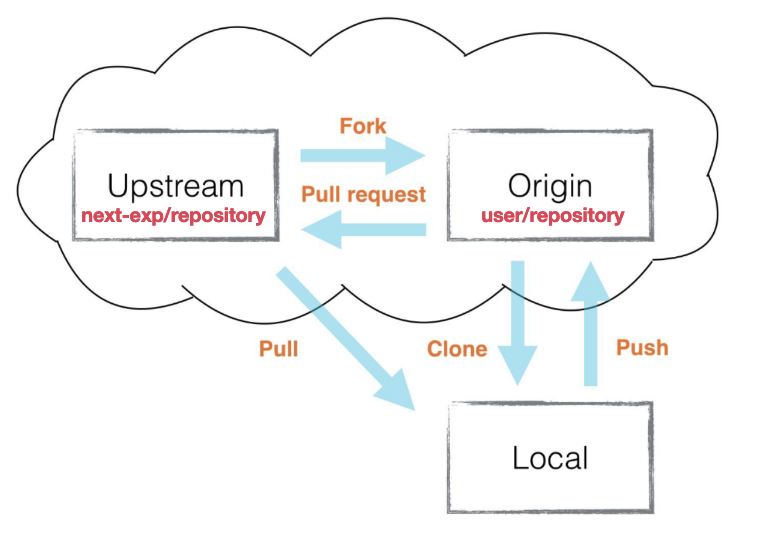
Based on this, you can define in your account the widely used convention:
upstreamas the remote of the original next-exp/repository.
originyour forked version user/repository.and
localyour local version, from cloning your fork.
The main branch of these three should be always at the same level. Keep your code updated!
Note
The next-exp/IC repository uses lfs (large file storage) for data files used within the IC package. Github offers an open source extension. We are using our own lfs server at IFIC for storage. Note that you would need to create an account in that server even when you are manipulating your own branch. In case of question, contact us.
Info for developers
In case you want to become a NEXT developer, you should always use a forked version of the main repository (see information from previous section). In that way, whenever you want to add or contribute, you would need to follow the next procedure:
Any code change should be made in a development branch, created locally. The name of the branch should preferably be something meaningful, related to the changes. In this example, it will be
dev_branch.Local changes should be Push to your forked
origin/dev_branch.Once it is ready to be added into the main code, its merge to
upstreamwill be requested via a Pull Request (PR, GitHub feature). Note that PR can only be opened from the website API.Your PR will be reviewed by other software developers.
When/before PR approved, the
dev_branchshould be rebased ontoupstream/master.Once it is approved, it will be merged with
upstream/master-> merging is only done by designated people:
IC: Carmen R, Miryam M-V, Helena A.
NEXUS: Paola F.
You can delete your
dev_branchlocally and remotely.